

Your website is getting traffic, but visitors are bouncing faster than a rubber ball. Sound familiar?
The problem isn’t your traffic source or your offer – it’s your landing page design. When someone clicks through to your WordPress site, you have about three seconds to convince them to stay and take action. That’s where strategic WordPress landing page design becomes your secret weapon.
A well-designed landing page doesn’t just look pretty; it guides visitors through a carefully crafted journey that ends with them becoming customers. Let me show you the seven essential elements that separate high-converting landing pages from digital dead ends.
Understanding the Psychology Behind Landing Page Design
Before diving into the technical elements, it’s crucial to understand what’s happening in your visitor’s mind when they land on your page.
When someone clicks through to your landing page, they’re in a specific mindset. They have a problem, a desire, or a question, and they’re evaluating whether your solution is worth their time and money. Your WordPress landing page design needs to speak directly to this mental state.
The most successful landing pages eliminate friction, build trust quickly, and make the next step obvious. Every element on your page should either move visitors closer to conversion or be removed entirely.
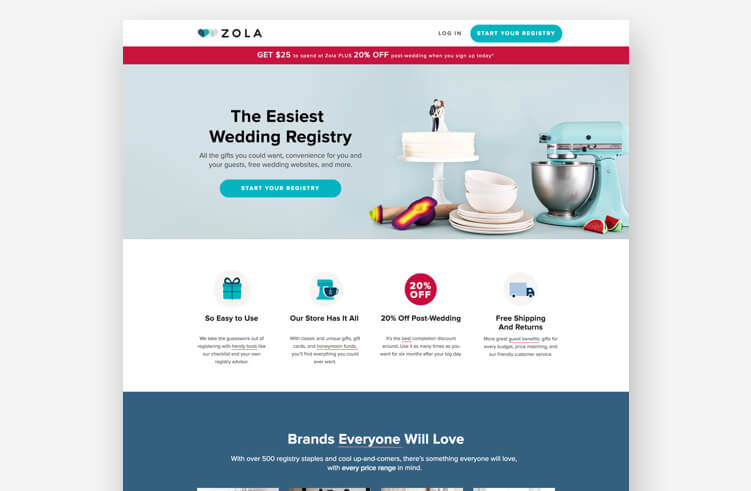
Element 1: A Compelling Headline That Hooks Immediately
Your headline is the first thing visitors see, and it might be the only thing they read. This makes it the most critical element of your WordPress landing page design.
What Makes a Headline Work
Effective headlines address the visitor’s primary concern or desire directly. They’re specific, benefit-focused, and create curiosity without being vague.
Instead of: “Welcome to Our Software Platform,” Try: “Cut Your Customer Support Time in Half with AI-Powered Responses.”
Headline Best Practices for WordPress Landing Pages
Keep it scannable: Use clear, simple language that can be understood in seconds. Avoid jargon unless your audience specifically expects it.
Focus on benefits, not features: People don’t buy products; they buy better versions of themselves. Your headline should paint a picture of their improved situation.
Create urgency or scarcity when appropriate: Phrases like “limited time” or “while supplies last” can motivate action, but only use them if they’re genuine.
Test different angles: Try problem-focused headlines (“Tired of losing customers to slow websites?”) versus solution-focused ones (“Get lightning-fast website speeds in 24 hours”).
Supporting Your Main Headline
Don’t let your headline carry all the weight. Support it with a compelling subheadline that provides additional context or reinforces the main message. This one-two punch gives you more space to communicate value while keeping the main headline punchy.

Element 2: Visual Hierarchy That Guides the Eye
WordPress landing page design isn’t just about making things look good – it’s about creating a visual roadmap that leads visitors exactly where you want them to go.
The F-Pattern and Z-Pattern
Most people scan web pages in predictable patterns. The F-pattern (reading across the top, down the left side, and across again) works well for content-heavy pages, while the Z-pattern (top left to top right, diagonally down, then left to right again) is perfect for simpler landing pages.
Design your WordPress landing page to work with these natural reading patterns, not against them.
Using Size and Contrast Strategically
Make important elements bigger: Your headline, call-to-action buttons, and key benefits should be the largest elements on the page.
Use contrast to create focus: A bright orange button on a blue background will draw attention, while a gray button on a white background will blend in.
Create white space: Don’t try to cram everything above the fold. White space gives your content room to breathe and makes your page feel less overwhelming.
Color Psychology in Landing Page Design
Colors trigger emotional responses that can influence conversion rates. Blue builds trust (which is why many financial companies use it), red creates urgency, green suggests safety and growth, and orange encourages action.
Choose your color scheme based on the emotional response you want to create, and use your brand colors strategically to reinforce recognition.
All Things WordPress – Design & Optimization
We craft WordPress websites that combine stunning visuals with performance and usability—so your brand makes the right impression and drives measurable results.
- Custom WordPress design
- Conversion-focused layouts
- Complete website redesigns
Element 3: Trust Signals That Eliminate Doubt
Visitors arrive at your landing page with natural skepticism. They don’t know you, and the internet is full of scams and disappointments. Your WordPress landing page design must address these concerns head-on.
Customer Testimonials and Reviews
Real testimonials from real customers are conversion gold. But not all testimonials are created equal.
Use specific details: “This saved me 3 hours per week” is more believable than “This is amazing!”
Include photos when possible: People connect with faces, and photos make testimonials feel more authentic.
Match testimonials to visitor concerns: If your main objection is price, include testimonials about value. If it’s ease of use, feature testimonials about simplicity.
Social Proof Indicators
Beyond testimonials, there are many ways to show that others trust you:
Customer logos: If you work with recognizable brands, display their logos prominently.
User counts: “Join 10,000+ satisfied customers” works better than “Join thousands of customers.”
Media mentions: Features in industry publications or major media outlets build credibility instantly.
Certifications and badges: Security badges, industry certifications, and professional memberships all contribute to trustworthiness.
Guarantees and Risk Reversal
The easier you make it for someone to try your product or service, the more likely they are to convert. Money-back guarantees, free trials, and “no questions asked” return policies remove the risk from the visitor’s decision.
Make your guarantee prominent in your WordPress landing page design, and explain exactly how it works.
Element 4: Clear and Compelling Call-to-Action
Your call-to-action (CTA) is where visitors become customers, but most landing pages treat this crucial element as an afterthought.
CTA Button Design Principles
Make it obvious: Your CTA button should be the most prominent element on the page. Use contrasting colors, adequate size, and plenty of white space around it.
Use action-oriented text: “Get Started,” “Download Now,” or “Claim Your Spot” work better than generic text like “Submit” or “Click Here.”
Create urgency: Phrases like “Start Your Free Trial Today” or “Get Instant Access” encourage immediate action.
Strategic CTA Placement
Don’t limit yourself to one CTA button. Place them strategically throughout your landing page:
- One above the fold for visitors ready to convert immediately
- One after your main benefits section for those who need more convincing
- One at the bottom of the page for people who read everything
Just make sure all your CTAs lead to the same action – multiple CTAs should reinforce your main goal, not create competing objectives.
Reducing Form Friction
If your CTA involves a form, every additional field reduces your conversion rate. Ask for the minimum information necessary to move the prospect to the next stage of your sales process.
For lead generation, an email address might be enough. For trial signups, you might need a name and company. For purchases, you’ll need payment information. But always ask yourself: “Do I really need this information right now?”
Element 5: Benefit-Focused Content That Resonates
Your WordPress landing page design should make your value proposition crystal clear within seconds, but the supporting content needs to reinforce and expand on that initial promise.
Features vs. Benefits: Getting It Right
Features describe what your product does. Benefits describe what your product does for the customer. Always lead with benefits.
Feature: “Our software has automated reporting capabilities.” Benefit: “Get weekly business insights delivered to your inbox without lifting a finger.”
The Problem-Solution-Benefit Framework
Structure your content to follow a logical progression:
- Acknowledge the problem: Show that you understand their pain point
- Present your solution: Explain how you solve their specific problem
- Highlight the benefits: Paint a picture of their improved situation
This framework works because it mirrors the thought process your visitors are already going through.
Using Stories and Case Studies
People connect with stories more than statistics. Include brief case studies or customer success stories that show real results from real people.
Keep these stories relevant to your target audience. A small business owner won’t connect with an enterprise case study, and vice versa.
Addressing Common Objections
Your landing page content should anticipate and address the most common reasons people don’t convert:
- Price concerns: Focus on value and ROI
- Time constraints: Emphasize ease of use and quick setup
- Technical complexity: Highlight simplicity and support
- Trust issues: Use testimonials and guarantees
- Feature sufficiency: Provide detailed benefit explanations
Element 6: Mobile-First Responsive Design
More people browse the web on mobile devices than on desktop computers, yet many WordPress landing pages still prioritize desktop design. This is a costly mistake.
Mobile User Behavior Differences
Mobile users have different expectations and behaviors:
- Shorter attention spans: They make decisions faster
- Thumb-friendly navigation: Buttons need to be large enough and properly spaced
- Vertical scrolling: They’re comfortable scrolling, but not horizontally
- Speed sensitivity: Slow loading pages are abandoned quickly
Essential Mobile Design Elements
Larger touch targets: Buttons and links should be at least 44 pixels square to accommodate finger taps accurately.
Simplified navigation: Complex menus don’t work on small screens. Keep your mobile navigation simple and focused.
Readable text: Use at least 16px font size for body text, and ensure adequate contrast for outdoor reading.
Fast loading times: Optimize images, minimize plugins, and use caching to ensure your page loads quickly on slower mobile connections.
Testing Your Mobile Experience
Don’t just check how your landing page looks on mobile – test how it feels to use:
- Can you easily tap all buttons?
- Is the text readable without zooming?
- Do forms work smoothly?
- Is the page loading speed acceptable?
Use real devices for testing, not just browser developer tools. The actual user experience can be quite different.
All Things WordPress – Design & Optimization
We craft WordPress websites that combine stunning visuals with performance and usability—so your brand makes the right impression and drives measurable results.
- Custom WordPress design
- Conversion-focused layouts
- Complete website redesigns
Element 7: Performance Optimization for Maximum Impact
A beautiful WordPress landing page design means nothing if the page takes forever to load. Website speed directly impacts conversion rates, with even small delays causing significant drops in performance.
Core Web Vitals and User Experience
Google’s Core Web Vitals measure real user experience metrics that affect both SEO and conversions:
Largest Contentful Paint (LCP): Measures loading performance. Aim for under 2.5 seconds.
First Input Delay (FID): Measures interactivity. Aim for under 100 milliseconds.
Cumulative Layout Shift (CLS): Measures visual stability. Aim for under 0.1.
WordPress-Specific Optimization Strategies
Choose a performance-focused theme: Some WordPress themes are built for speed, while others prioritize features over performance. Choose wisely.
Optimize images: Use appropriate file formats (WebP when possible), compress images without losing quality, and implement lazy loading.
Minimize plugins: Every plugin adds code that needs to load. Only use plugins that provide essential functionality for your landing page.
Use caching: WordPress caching plugins can dramatically improve loading speeds by serving static versions of your pages.
Optimize your database: Regular database cleanup removes unnecessary data that can slow down your site.
Content Delivery Networks (CDNs)
A CDN serves your landing page content from servers closest to your visitors, reducing loading times regardless of their geographic location. This is especially important if you’re targeting a global audience.
Regular Performance Monitoring
Use tools like Google PageSpeed Insights, GTmetrix, or Pingdom to regularly monitor your landing page performance. Set up alerts so you know immediately if performance degrades.
Advanced WordPress Landing Page Design Strategies
Once you’ve mastered the seven essential elements, these advanced strategies can help you squeeze even more conversions from your traffic.
A/B Testing Your Landing Page Elements
Never assume you know what works best. Test different versions of your headlines, CTAs, images, and layouts to find what resonates most with your audience.
Start with high-impact elements: Test headlines and CTA buttons first, as these typically have the biggest impact on conversions.
Test one element at a time: Changing multiple elements simultaneously makes it impossible to know what caused any changes in performance.
Ensure statistical significance: Run tests long enough to gather meaningful data. Small sample sizes lead to unreliable conclusions.
Personalization and Dynamic Content
WordPress plugins and tools can help you customize your landing page content based on visitor characteristics:
- Traffic source: Show different headlines to visitors from social media versus search engines
- Geographic location: Display local phone numbers or currency
- Return visitors: Show different content to people who’ve visited before
- Device type: Optimize content specifically for mobile versus desktop users
Advanced Conversion Tracking
Beyond basic conversion tracking, implement event tracking to understand how visitors interact with your landing page:
- Scroll depth: How far down the page do visitors scroll?
- Time on page: How long do people spend reading your content?
- Click tracking: Which elements do visitors click on most?
- Form analytics: Where do people abandon your forms?
This data helps you identify bottlenecks and optimization opportunities.
Exit-Intent Technology
Exit-intent popups detect when visitors are about to leave your page and can offer last-chance incentives to convert. When used strategically, they can recover conversions that would otherwise be lost.
Common WordPress Landing Page Design Mistakes
Learning from common mistakes can save you time and improve your results faster.
Mistake 1: Too Many Choices
Decision paralysis is real. When you give visitors too many options, they often choose nothing. Keep your landing page focused on one primary goal.
Mistake 2: Weak or Missing Value Proposition
If visitors can’t quickly understand what you’re offering and why they should care, they’ll leave. Your value proposition should be clear, specific, and prominently displayed.
Mistake 3: Ignoring Page Loading Speed
A two-second delay in page loading can increase bounce rates by over 100%. Fast loading isn’t optional – it’s essential.
Mistake 4: Poor Mobile Experience
Designing for desktop first and mobile second creates suboptimal mobile experiences. Start with mobile and enhance for larger screens.
Mistake 5: Generic Stock Photos
Stock photos of people in business suits shaking hands don’t build trust – they scream “generic corporate website.” Use authentic images that connect with your specific audience.
Mistake 6: Buried Contact Information
Even if your goal is to generate leads through a form, some visitors will want to contact you directly. Make it easy for them to find your contact information.
Tools and Plugins for WordPress Landing Page Design
The right tools can streamline your landing page creation process and improve your results.
Page Builder Plugins
Elementor: Offers drag-and-drop design capabilities with extensive customization options and conversion-focused templates.
Beaver Builder: Known for clean code output and user-friendly interface, making it great for both beginners and developers.
Divi: Provides visual editing with advanced design capabilities and built-in split testing features.
Optimization Plugins
OptinMonster: Specializes in lead generation forms and exit-intent technology.
Thrive Leads: Offers comprehensive lead generation tools with advanced targeting options.
WP Rocket: Provides caching and performance optimization specifically for WordPress sites.
Analytics and Testing Tools
Google Analytics: Essential for tracking conversions and understanding visitor behavior.
Hotjar: Provides heatmaps and session recordings to see how visitors interact with your pages.
Optimizely: Professional A/B testing platform for systematic optimization.
Form and Lead Generation Tools
Gravity Forms: Powerful form builder with extensive customization options and integrations.
WPForms: User-friendly form creator with drag-and-drop functionality.
Mailchimp for WordPress: Seamless integration with email marketing campaigns.
Measuring and Improving Your Landing Page Performance
Creating your landing page is just the beginning. Continuous improvement based on real data is what separates good landing pages from great ones.
Key Performance Indicators (KPIs)
Conversion Rate: The percentage of visitors who complete your desired action. This is your primary metric.
Bounce Rate: The percentage of visitors who leave without interacting with your page. High bounce rates often indicate messaging or design problems.
Time on Page: How long visitors spend reading your content. Very short times might indicate unclear messaging, while very long times might suggest confusing navigation.
Traffic Quality: Not all traffic is equal. Measure conversion rates by traffic source to identify your most valuable channels.
Setting Up Proper Tracking
Goal Configuration: Set up specific goals in Google Analytics that match your landing page objectives.
Event Tracking: Monitor interactions like button clicks, form submissions, and video plays.
Attribution Modeling: Understand the full customer journey, not just the last click before conversion.
Regular Review and Optimization
Monthly Performance Reviews: Analyze your landing page data monthly to identify trends and opportunities.
Quarterly Design Audits: Regularly review your design for outdated elements, broken functionality, or new optimization opportunities.
Competitive Analysis: Keep an eye on what successful competitors are doing with their landing pages.
User Feedback: Regularly survey customers about their experience with your landing page and conversion process.
Conclusion
WordPress landing page design isn’t about following a template or copying what others are doing – it’s about understanding your audience and creating an experience that guides them naturally toward conversion.
The seven elements we’ve covered – compelling headlines, visual hierarchy, trust signals, clear CTAs, benefit-focused content, mobile optimization, and performance – work together to create landing pages that turn clicks into customers. But remember, the best landing page design is one that’s continuously tested and improved based on real user data.
Every business and audience is different, so what works for one company might not work for another. Start with these proven principles, then test and refine based on your specific results. Pay attention to your analytics, listen to customer feedback, and don’t be afraid to make bold changes when the data supports them.
The difference between a landing page that converts and one that doesn’t often comes down to the details – the right headline, the perfect button color, the ideal form length, or the most compelling testimonial placement. These details matter because they add up to create an experience that either builds confidence or creates doubt.
Most importantly, remember that great WordPress landing page design serves your visitors first and your business second. When you create genuine value for the people who visit your pages, conversions follow naturally.
If you’re ready to create WordPress landing pages that consistently turn visitors into customers but want the expertise of professionals who understand both design principles and conversion psychology, our WordPress design services team can help you build landing pages that deliver real results for your business.