

Looking to create a stunning website with WordPress, but worried about coding? You’re not alone. Thousands of business owners, entrepreneurs, and creative professionals face this same question every day. The good news? Modern WordPress has evolved into a powerful platform that puts professional web design within everyone’s reach – no computer science degree required.
Why WordPress Has Become the Go-To Choice for Web Design
WordPress powers a significant portion of the internet, and for good reason. Unlike other platforms that lock you into rigid templates, WordPress offers the perfect balance of flexibility and user-friendliness. Whether you’re launching a personal blog, business website, or online store, WordPress adapts to your needs rather than forcing you to adapt to its limitations.
The platform’s visual approach to web design has revolutionized how people create websites. Gone are the days when building a professional-looking site required hours of coding tutorials or expensive developer fees.
What You CAN Accomplish with WordPress (No Coding Required)
Professional Theme Customization
WordPress themes today go far beyond simple templates. Modern themes offer extensive customization options that let you:
- Adjust colors, fonts, and layouts with intuitive point-and-click controls
- Upload your own logo and branding elements seamlessly
- Modify headers, footers, and navigation menus without touching a single line of code
- Choose from hundreds of pre-designed sections that you can mix and match
The WordPress Customizer gives you a live preview of your changes, so you can see exactly how your site will look before publishing.
Drag-and-Drop Page Building
Page builders have transformed web design with WordPress. Tools like Elementor, Beaver Builder, and the built-in Gutenberg editor allow you to:
- Create complex layouts by simply dragging elements where you want them
- Add professional elements like testimonial sections, pricing tables, and contact forms
- Design unique pages without duplicating the same template structure
- Build landing pages that convert visitors into customers
Think of it like arranging furniture in a room – you can move things around until everything looks just right.
Responsive Design Made Simple
Your website will automatically adapt to different screen sizes. Most WordPress themes are built with mobile responsiveness in mind, ensuring your site looks great on:
- Desktop computers
- Tablets
- Smartphones
- Various screen resolutions
You can preview how your site appears on different devices directly from your WordPress dashboard.
All Things WordPress – Design & Optimization
We craft WordPress websites that combine stunning visuals with performance and usability—so your brand makes the right impression and drives measurable results.
- Custom WordPress design
- Conversion-focused layouts
- Complete website redesigns
Adding Functionality with Plugins
WordPress plugins are like apps for your website. Want to add a contact form? There’s a plugin for that. Need an online store? Plugin. Social media integration? Plugin. Popular options include:
- Contact Form 7 or WPForms for capturing leads
- WooCommerce for e-commerce functionality
- Yoast SEO for search engine optimization
- MonsterInsights for website analytics
- UpdraftPlus for automated backups
Most plugins work through simple setup wizards that guide you through the process.
Creating Dynamic Content
WordPress excels at organizing and displaying content. You can easily:
- Set up blog categories and tags for better organization
- Create image galleries that showcase your work
- Build portfolio sections with filtering options
- Add testimonial sliders to build trust
- Set up event calendars for businesses and organizations
Basic SEO Optimization
WordPress includes built-in features that help search engines understand your content:
- Clean URL structures that include your page titles
- Automatic XML sitemaps that help search engines index your pages
- Meta description and title customization for better search results
- Image alt text fields for accessibility and SEO
- Fast loading speeds when properly configured

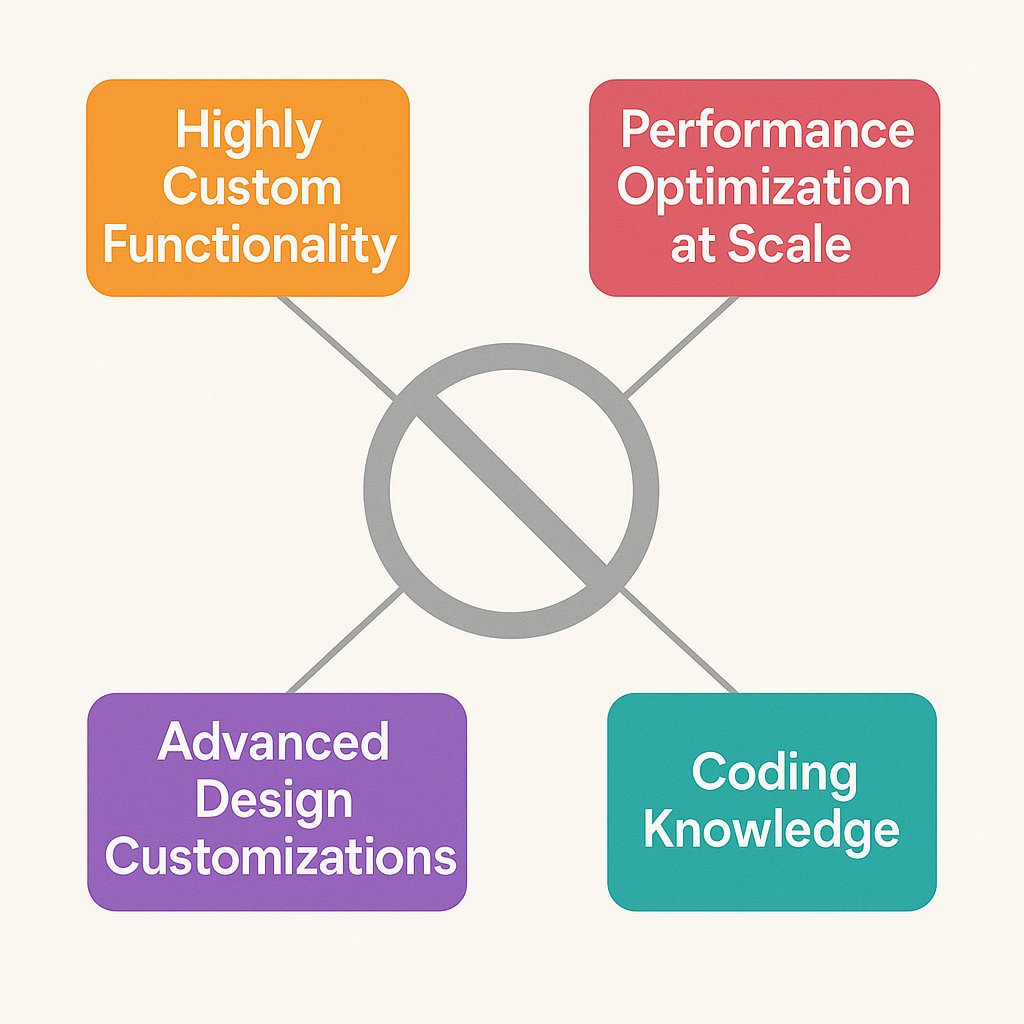
What You CAN’T Do Without Coding Knowledge
Highly Custom Functionality
While WordPress is flexible, some advanced features require custom development:
- Complex database integrations with external systems
- Custom user dashboards with specialized permissions
- Advanced e-commerce features beyond standard online stores
- Unique animations and interactions that aren’t available in themes or plugins
Advanced Design Customizations
Certain design elements may require CSS or PHP knowledge:
- Completely custom layouts that break away from theme structures
- Advanced typography control beyond theme options
- Custom post types and fields for specialized content
- Complex conditional logic that shows different content to different users
Performance Optimization at Scale
While basic optimization is manageable, high-traffic sites may need custom solutions:
- Advanced caching configurations
- Database optimization
- Custom CDN setups
- Server-level performance tweaks
Making the Right Choice for Your Project
Start with No-Code Solutions When:
- You’re building a standard business website or blog
- Your design needs fit within modern theme capabilities
- You want to launch quickly and cost-effectively
- You prefer maintaining your own website
Consider Professional Development When:
- You need unique functionality not available through plugins
- Your design vision requires extensive customization
- You’re building a complex web application
- You lack time to learn the platform yourself
Getting Started: Your WordPress Web Design Roadmap
Step 1: Choose Your WordPress Setup
- WordPress.org (self-hosted) offers complete control and customization
- WordPress.com provides hosting but with some limitations
Step 2: Select a Quality Theme
Look for themes that are:
- Regularly updated by their developers
- Compatible with popular plugins
- Responsive and mobile-friendly
- Well-reviewed by other users
Step 3: Plan Your Content Structure
Before diving into design:
- Map out your main pages and navigation
- Gather your content, images, and branding materials
- Consider your user’s journey through your site
Step 4: Customize Gradually
- Start with basic customizations (colors, fonts, logo)
- Add content to your main pages
- Install essential plugins
- Test your site on different devices
All Things WordPress – Design & Optimization
We craft WordPress websites that combine stunning visuals with performance and usability—so your brand makes the right impression and drives measurable results.
- Custom WordPress design
- Conversion-focused layouts
- Complete website redesigns
Common Mistakes to Avoid
Over-customizing from the start – Get your basic site functional before adding complex features.
Choosing themes based on looks alone – Prioritize functionality and support over flashy designs.
Installing too many plugins – Each plugin can slow down your site and create potential conflicts.
Ignoring mobile users – Always test your site on smartphones and tablets.
Skipping backups – Set up automated backups before you start customizing.
The Bottom Line
Web design with WordPress offers an impressive middle ground between DIY website builders and custom development. You can create professional, functional websites without coding knowledge, but understanding the platform’s limitations helps you make informed decisions about when to seek additional help.
The key is starting with realistic expectations and growing your skills over time. Many successful website owners began with basic WordPress sites and gradually learned more advanced techniques as their needs evolved.
Whether you’re launching your first website or considering a redesign, WordPress provides the tools and flexibility to bring your vision to life. The question isn’t whether you can create a great website with WordPress – it’s how quickly you want to get started.